
 Previous

Enhance Social Media Posts with My Free Lightroom Preset
I’ll show you how to enhance social media posts with my free lightroom preset in just a few simple steps. In today’s visually-driven world, making your social media posts stand out is crucial. A professional and aesthetically pleasing feed can attract more followers, increase engagement, and effectively promote your brand. The good news? You don’t need to be a professional photographer or designer to achieve this. With this free Lightroom preset, you can effortlessly make your social media posts look stunning in seconds.
Why Use Lightroom Presets for Social Media?
Over the years, I’ve seen people either overcomplicate photo editing or neglect it entirely. Your social media posts, especially for a business, should look polished and professional. But here’s the secret: it doesn’t have to be hard.
Benefits of Using Lightroom Presets:
- Consistency: Ensures a uniform look across all your posts.
- Efficiency: Saves time with one-click edits.
- Quality: Enhances photo quality without needing advanced editing skills.
Step-by-Step Guide: Using the Free Lightroom Preset
I’m going to walk you through how to do this right from your phone in no time, simply follow these steps to enhance your social media posts instantly with this free lightroom preset:
- Download and Install the Lightroom App:
- Download and Unzip the Preset File:
- Click here to download the preset.
- Unzip the file on your phone.
- Import the Preset into Lightroom:
- Open the Lightroom app.
- Click the three dots at the top right corner.
- Select “Create Preset”.
- Name your preset and save it.
- Apply the Preset to Your Photos:
- Import or open the photo you want to edit in Lightroom.
- Click the preset button at the bottom of your screen.
- Select the preset you just created.
- Export and Share:
- Once satisfied with the edit, export your photo.
- Share your beautifully edited photo on social media.
T2ADA!
Enhance Social Media Posts with My Free Lightroom Preset
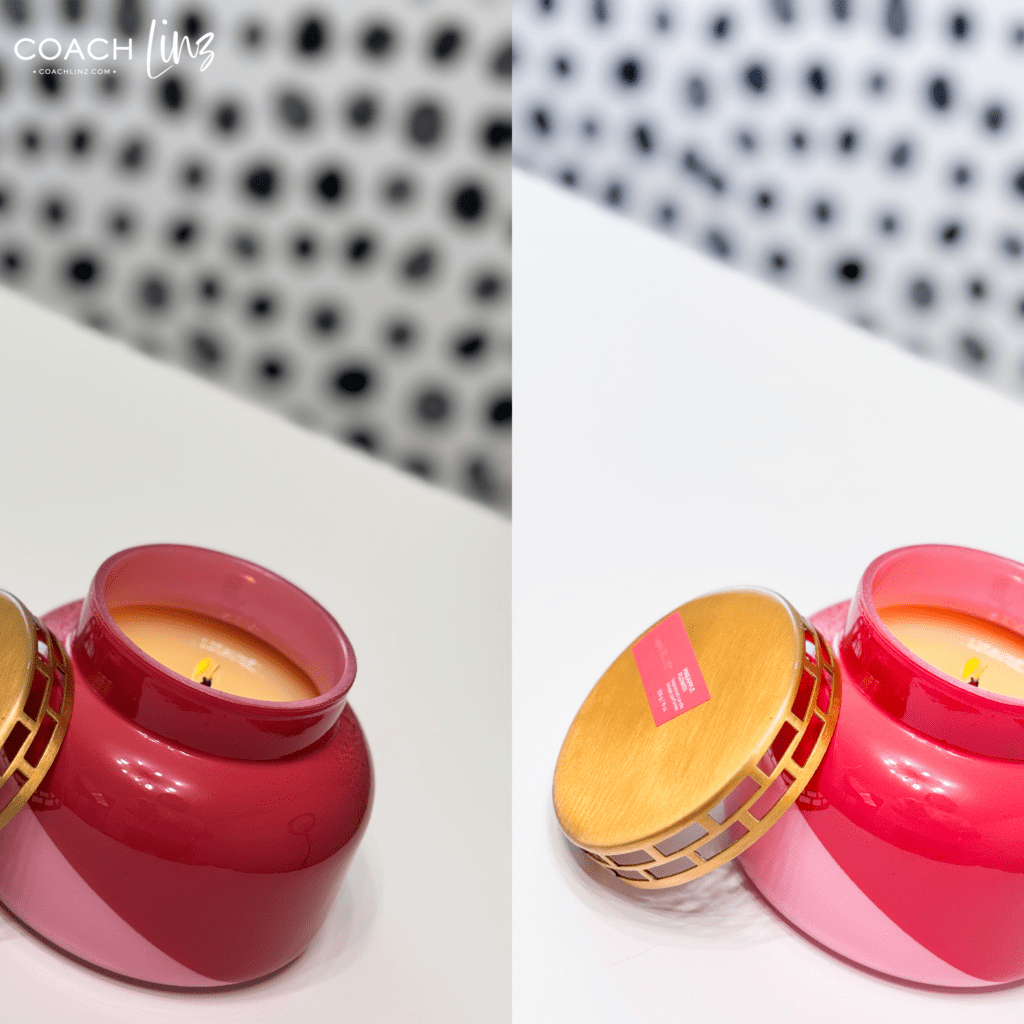
Pro Tips for Mobile Photo Editing
While the preset provides a quick fix, you might want to tweak the settings to better match your specific photos. Adjustments such as increasing clarity, sharpness, exposure, and saturation can significantly enhance your images. Experiment with these settings to create your own unique Lightroom preset that perfectly suits your style and subject matter.
Social media photo editing tips
I’ll continue to share social media photo editing tips here on the blog, as well as small, but impactful tweaks you can make to expand your reach. This free lightroom preset is the first of many resources I’ll be sharing in my
Conclusion
Editing your photos doesn’t have to be a daunting task. With minimal effort, you can achieve maximum impact on your social media visuals. Download the free Lightroom preset and start creating professional-quality posts today.
Enhance Social Media Posts with My Free Lightroom Preset
Look at you, editing photos like a pro! Minimum effort, maximum gain my friends. Happy posting!
Written By: Lindsey Riel
